
Microsoft 365 & Modern Work
A connected workplace,
ready for Copilot.
Velosio migrates, organizes, and secures Microsoft 365, Teams, and SharePoint, then activates Copilot role by role. Your people find what they need, work from anywhere, and get real value from the licenses you already pay for.
90+
Microsoft 365 Copilot workshops delivered
Modern Work
Microsoft Solutions Partner designation
Jumpstart
Copilot Jumpstart Ready Partner
31 years
Microsoft Inner Circle recognition
Copilot is only as good as your content and permissions
In Velosio’s 2026 AI Readiness Research, 86% of mid-market organizations have bought Copilot licenses, but only 20% say more than three-quarters of licensed employees use it weekly. Fifty-seven percent say their governance doesn’t fully address AI that acts on its own.
When SharePoint, OneDrive, and Teams hold sensitive, outdated, or broadly shared files, Copilot and agents can surface the wrong information to the wrong people. And even with clean content, licenses sit idle when no one shows people how Copilot fits their job. In our work with clients, the same five blockers come up again and again:
| 1 | Frontline users don’t see the valueIT and leadership like it. Everyday users haven’t seen it solve their work. |
| 2 | Too few people have itWhen only a handful of users get licenses, Copilot gets labeled a niche tool. |
| 3 | No role- or industry-specific use casesGeneric demos don’t translate to Finance, Operations, or the field. |
| 4 | Wins aren’t sharedNo champions, no prompt library, no one calling out time saved. |
| 5 | No one is steeringBought, announced in one email, and forgotten. Big-bang launches fizzle fast. |
|
|
20% of organizations see more than three-quarters of licensed employees using Copilot weekly. We help you get into that group. |
Business Outcomes
What changes when
Microsoft 365 is set up for AI
Microsoft 365 is already where your people work. Set up well, it becomes the foundation that makes Copilot useful, safe, and worth the spend.
Adopt AI at Scale
Copilot people actually use
A governed foundation for Copilot, plus role-based adoption that moves usage past the early enthusiasts.
Measure: weekly active and repeat users
Improve operational efficiency
One place for files, conversations, and calls
Meeting recaps, daily briefings, and first drafts cut the manual work around every project.
Measure: time saved per meeting and document
Mitigate risk & ensure compliance
Controls that hold up to audits
Permissions, retention, and sensitivity labels in place before AI makes gaps visible.
Measure: overshared content found and fixed
Deliver next-level customer experience
Faster answers for customers
Field and office teams are connected, so the person a customer asks has the answer.
Measure: response time and follow-through
SOLUTIONS
Modern platforms work best when
they support better decisions
Each part of Microsoft 365 plays a role in how Copilot performs. Here’s what each one does today and where Velosio helps.
Microsoft 365 Copilot
What It Is Now
Microsoft’s paid AI assistant, grounded in your email, meetings, chats, and files through Work IQ. It unlocks ready-made agents, agent building, and access to multiple AI models.
How Velosio Helps
We match plans to user personas, fix permissions before rollout, and activate Copilot role by role so usage sticks.
- Licensing review: bundled “with Copilot” plans vs. add-on
- Readiness checks for oversharing, labels, and data access
- Role-based use cases and prompt patterns your teams reuse
Microsoft 365
What It Is Now
Microsoft’s productivity suite, now the foundation for Microsoft 365 Copilot and Work IQ, which grounds Copilot in your organization’s content.
How Velosio Helps
Velosio handles licensing guidance, tenant consolidation, migration, and administration.
- Right-size plans from Business Basic to E5 and E7
- Consolidate multiple tenants after mergers and acquisitions
- Ongoing administration through managed services
Microsoft Teams
What It Is Now
Chat, meetings, calling, and the place where Copilot recaps meetings, tracks decisions, and drafts follow-ups.
How Velosio Helps
We lead Teams and Teams Phone projects and connect Teams to the Dynamics 365 workflows your people already run.
- Teams Phone migrations off legacy phone systems
- Meeting recap and action-item workflows with Copilot
- Teams governance: naming, lifecycle, and guest access
SharePoint & OneDrive
What It Is Now
Where your files live, and the content Copilot draws on. Oversharing here is what Copilot surfaces first.
How Velosio Helps
We clean up, organize, and govern content so Copilot surfaces the right information to the right people.
- Permission and oversharing review before Copilot rollout
- Sensitivity labels, retention, and archiving of outdated content
- A gold-standard home for templates, procedures, and brand assets
Microsoft Viva
What It Is Now
Employee experience tools for communications, learning, and insights, including how AI is being adopted across teams.
How Velosio Helps
We use Viva to keep adoption visible after launch, with champion communities, learning paths, and usage insight.
- Copilot champion communities and shared prompt libraries
- Role-based learning paths
- Adoption and usage reporting for leaders
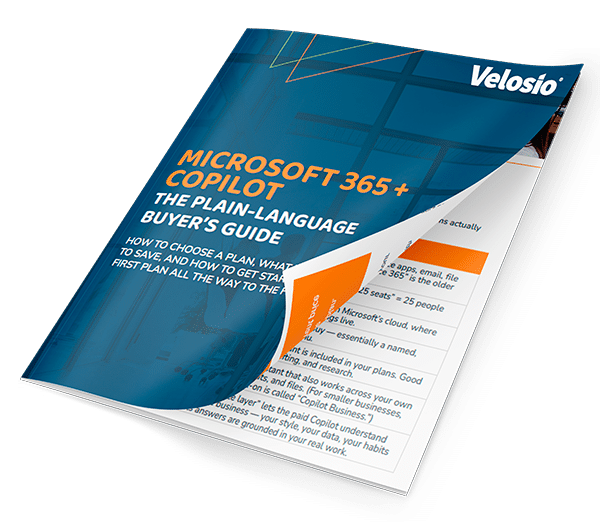
Free Guide
Microsoft 365 + Copilot: the plain-language buyer’s guide
How to choose a plan, what it costs, the ways to save, and how to get started, from your first plan all the way to the Frontier Suite (E7).
| ✓ A plain-English decoder for every term | ✓ Every plan, rung by rung |
| ✓ Pricing at a glance | ✓ Ways to save on Copilot seats |
| ✓ Your first 30 days | ✓ Security and trust, explained |
Research-Backed Proof
The Copilot gap, in numbers
86%
bought Copilot licenses. Only 20% see broad weekly use.
Licenses aren’t adoption. Most organizations have paid for Copilot, but only one in five say more than three-quarters of licensed employees use it weekly.
So what: the gap is enablement and content readiness, not licensing.
Source: Velosio 2026 AI Readiness Research, mid-market organizations. See how you compare →
WHY VELOSIO
We don’t just turn Copilot on.
We get people using it.
Velosio’s cloud team leads Teams, Teams Phone, SharePoint, and Microsoft 365 Copilot projects and runs Copilot workshops for clients across industries. Because we also implement Dynamics 365, we connect Copilot to the systems where your business actually runs.
Copilot-ready governance
We fix oversharing, permissions, and labels before AI makes them visible, and give you an acceptable-use framework your board and insurers can understand.
Connected to business applications
Teams and SharePoint connected to Dynamics 365 workflows, not standing alone, so Copilot and agents can work with your finance, sales, and operations data.
Adoption that sticks
Department-by-department rollout, internal champions, and a simple prompt pattern your people reuse. See Adoption & Change.
Smaller teams can compress this into two weeks. Larger or regulated organizations typically run 45 to 60 days to allow for security review and department-specific enablement.
WAYS TO START
Pick the starting point that
fits where you are.
COMPLIMENTARY
Copilot Jumpstart Workshop4 to 10 hours of expert-led, hands-on sessions with 10+ Copilot licenses: real use cases, prompting techniques, and take-home prompt guides. |
LICENSING
M365 & Copilot Licensing ReviewFind licensing gaps and overlaps, align Copilot seats to personas, and compare bundled vs. add-on plans. |
AGENTS
Agentic AI Express WorkshopPrioritize agent use cases by business impact, quantify ROI, and leave with a draft business case for executive review. |
STRATEGY
AI Strategy & Activation AcceleratorReadiness scorecard, data and governance assessment, guardrails, and a 90-day activation roadmap. |
What workshop attendees ask for next● Connecting Copilot to Dynamics 365 and Dynamics GP data ● Pairing Copilot with Power Automate to remove manual steps ● A licensing review to put seats where they’ll be used ● Copilot Studio for their own custom agents ● Follow-on training and role-based workshops |
Agents our workshops have scoped● Invoice automation and payables agents ● Sales and purchasing agents ● Vendor data intake and normalization ● Board-meeting intelligence for finance teams ● HR and policy handbook guidance |
Drawn from Velosio Copilot and agentic AI workshop follow-ups, 2025–2026.
Frequently Asked Questions
How do we prepare Microsoft 365 for Copilot?
Can you move our phone system to Teams?
We have multiple Microsoft 365 tenants. Can you consolidate them?
Which Copilot plan is right for us?
How do we increase Copilot usage?
CASE STUDIES
Explore our success stories
Our Clients








Microsoft Inner Circle recognition – Velosio has earned Microsoft Inner Circle recognition for 31 consecutive years.

#1 in Business Central Implementations Worldwide – Velosio is recognized as the leader in Microsoft Dynamics 365 Business Central implementations worldwide.
Recognized by Microsoft. Recommended by clients.
implementations worldwide
Partner designations
Ready Partner
Top 1% of Global Microsoft Partners | 30 Years Inner Circle
As a Top 1% Microsoft partner and 30-year Inner Circle member, we bring deep expertise across business applications, cloud, data, and AI.
Tell us where you’re headed. We’ll help you get there faster
 |
Give us a call: 888.725.2555 |
 |
Message Us: info@velosio.com |
 |
Corporate Headquarters: 300 Galleria Pkwy SE, Suite 615 Atlanta, GA 30339 |