The Best ERP Modernization Path for NAV, SL & GP: Maintain, Fortify, Bridge or Transform?
Explore four ERP modernization paths for Dynamics NAV, SL & GP — Maintain, Fortify, Bridge, or Transform — and discover Azure, Fabric, and AI advantages.

Table of Content
If you run Dynamics NAV, SL, or GP, you’ve likely felt some pressure lately. Maybe it’s the aging server. Maybe it’s the growing list of manual workarounds. Maybe it’s the quiet fear that one more month‑end close might push your team over the edge.
You’re not alone. And you’re not stuck.
This guide walks through the four modernization paths we covered in our recent webinar — Maintain, Fortify, Bridge, and Transform — so you can choose the path that fits your timing, your risk, your budget, and your team.
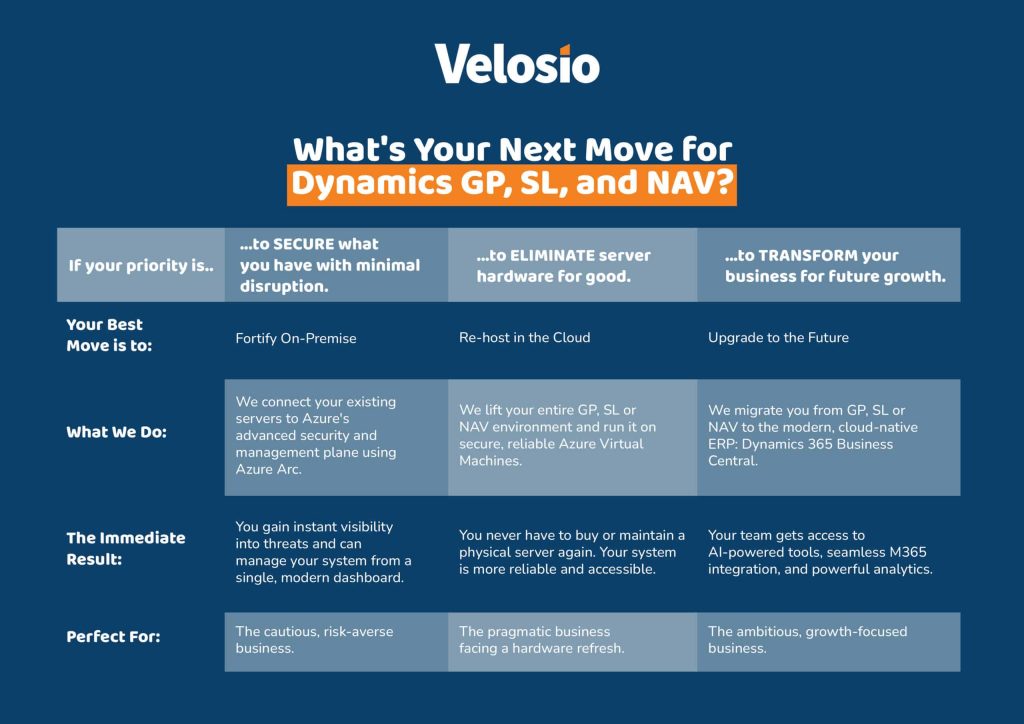
Companies using legacy on‑prem ERPs like NAV, SL, and GP usually fall into one of four camps:
Each path fits a different organizational reality.
Each solves a different type of risk.
Each sets you up for a different future.
Maintain is an intentional pause. It’s keeping your ERP exactly where it is — no changes, no upgrades, no workflow disruption. It’s the “we need to breathe first” option.
Maintain = pause. Not plan.
If Maintain is “pause,” Fortify is “protect.”
Fortify uses Azure Arc to wrap your on‑prem NAV/SL/GP system in cloud‑grade governance, security, and monitoring — while keeping the ERP firmly on‑prem.
This means:
Organizations that say:
“We know NAV/SL/GP is aging — but we’re not ready to change ERPs or move to Azure.”
Fortify buys 12–24 months of breathing room without increasing risk.
Watch the full webinar replay to see real‑world examples of how organizations running Dynamics GP, SL, and NAV are evaluating Fortify, Bridge, and Transform paths.
Yes — that’s exactly what Bridge does.
Bridge is a lift‑and‑shift of NAV, SL, or GP into Microsoft Azure.
The ERP itself stays exactly the same.
Your team won’t see a single screen change.
But behind the scenes?
Everything is more stable, more secure, and easier to manage.
Once NAV/SL/GP lives inside Azure, you gain access to:
That means:
You modernize data without modernizing ERP.
It’s the perfect “middle path.”
Transform means adopting Dynamics 365 Business Central — Microsoft’s cloud ERP designed for the next 10–15 years of work.
With Copilot in Business Central:
Transform doesn’t just modernize ERP. It modernizes the way your entire finance team works.
You need stability, space, and a pause.
You need audit‑ready security and breathing room without changing ERP.
You want Azure reliability while keeping your ERP exactly the same.
You’re ready for cloud, AI, automation, and long‑term scalability.
Most companies end up with a staged roadmap:
Maintain → Fortify → Bridge → Transform
The timing varies — but the journey stays similar.
Yes — and these can significantly reduce or offset costs.
These programs can cover:
Most organizations are surprised how much funding they qualify for.
No — some companies go straight to Bridge.
No — some jump directly from on‑prem to Business Central.
Yes — Bridge + Fabric does exactly that.
No. These paths do not change the ERP experience.
Typically 3–4 months for standard implementations, longer for complex environments.
Yes. Microsoft provides data migration tools for GP and SL, and NAV migrations are well‑established.
Whether you are:
…your next step doesn’t have to be overwhelming.
A short conversation with our team can help you:
With all legacy Dynamics versions past mainstream support and the 2028 end‑of‑life approaching, organizations are being asked to make thoughtful, realistic decisions about what comes next.
Velosio offers three clear strategic paths—Fortify, Bridge, and Transform—to help you move forward on your terms. Schedule a free, no‑obligation consultation, and our consultants will help you define a modernization roadmap that aligns with your risk, timeline, budget, and business goals.
Talk to us about how Velosio can help you realize business value faster with end-to-end solutions and cloud services.