Microsoft Copilot Partner: Driving Efficiency with Copilot Agents and Teams Integration
Discover how Velosio, a leading Microsoft Copilot Partner, leverages Copilot Agents and Teams integration to meet users where they are.

In today’s fast-paced business environment, organizations are constantly seeking ways to streamline processes, improve user adoption, and maximize productivity. As a Microsoft Copilot Partner, Velosio is at the forefront of this transformation, leveraging Copilot Agents to create intelligent workflows that meet users where they are, inside Microsoft Teams, rather than forcing them to navigate multiple applications like Dynamics 365 CE/CRM (Customer Engagement) or FO (Finance and Operations).
This approach is not just about convenience; it’s about redefining user experience and boosting operational efficiency. Let’s explore how Copilot Agents work, why they matter, and how Velosio is pioneering this strategy for clients.
Copilot Agents are intelligent, task-specific assistants designed to communicate with users outside of the core application. Instead of requiring users to log into CRM or FO to perform routine tasks, these agents integrate directly with Microsoft Teams, enabling users to:
This concept aligns perfectly with Microsoft’s vision of “meeting users where they are”, reducing friction and improving adoption across enterprise systems.
Consider a common scenario in a professional services related business: time entry compliance. If an employee fails to log eight hours in a day, they receive an email reminder. To correct this, the user must:
This process is inefficient and disruptive, pulling users away from their primary workspace and requiring multiple steps. For busy professionals, these interruptions add up, impacting productivity and user satisfaction.
Enter the Time Entry Copilot Agent. Instead of sending an email, the agent notifies the user in Microsoft Teams that they have not entered eight hours. The notification includes:
This streamlined process saves time, reduces friction, and ensures compliance, all while keeping users in their preferred workspace.
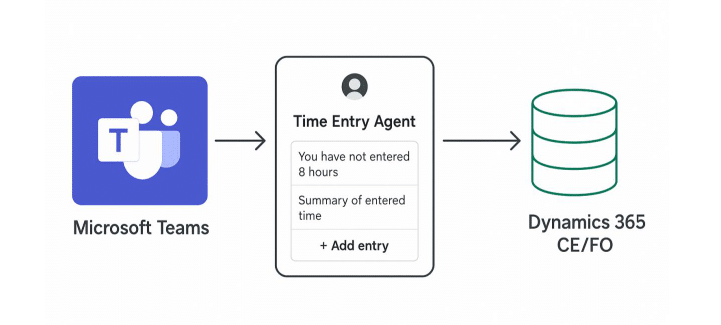
Copilot Agents leverage Power Automate Flows to execute processes. These flows handle:
This architecture makes Copilot Agents flexible and scalable, allowing organizations to automate a wide range of tasks beyond time entry, such as expense approvals, project updates, and customer follow-ups.
To fully realize the potential of Copilot Agents, organizations must invest in Power Automate skills, this ensures:
Power Automate is the backbone of Copilot Agent functionality, and upskilling teams is essential for success.
As a leading Microsoft Copilot Partner, Velosio is committed to creating custom agents that deliver measurable business value. Our strategy includes:
This approach not only improves efficiency but also drives user adoption, as employees can complete tasks without leaving their collaboration hub.
Let’s revisit the Time Entry Agent example:
This transformation illustrates the power of Copilot Agents to simplify workflows and improve compliance without sacrificing accuracy or security.
As businesses embrace digital transformation, the ability to meet users where they are becomes a competitive advantage. Copilot Agents represent a paradigm shift in how organizations interact with enterprise applications, bringing functionality into collaboration tools like Teams and eliminating unnecessary friction.
Velosio, as a Microsoft Copilot Partner, is leading this charge by designing intelligent, user-centric solutions that combine Copilot Agents, Power Automate, and Dynamics 365 to deliver efficiency, adoption, and measurable ROI.
Contact Velosio today to learn how our Copilot Agent solutions can streamline your processes and empower your team to work smarter—not harder.
David Buggy is the Vice President of CE and Power Platform at Velosio, where he leads strategic initiatives to help organizations unlock the full potential of Microsoft Dynamics 365 and the Power Platform. With deep expertise in Customer Engagement /CRM and the Power Platform, David is passionate about driving digital transformation through innovative solutions like Copilot Agents and Teams integration.
Talk to us about how Velosio can help you realize business value faster with end-to-end solutions and cloud services.