Microsoft Copilot Notebooks: The Next Frontier in AI-Powered Productivity
Microsoft Copilot Notebooks is a groundbreaking feature designed to centralize your content and supercharge productivity with AI. Learn more!

In today’s fast-paced digital workplace, information overload is real. Teams juggle documents, meeting notes, chats, and data scattered across multiple apps. The result? Lost time, fragmented workflows, and missed insights. Enter Microsoft Copilot Notebooks a groundbreaking feature designed to centralize your content and supercharge productivity with AI.
As a Microsoft Copilot Partner, Velosio helps organizations harness this innovation to transform how work gets done. In this blog, we’ll explore what Copilot Notebooks are, why they matter, and how Velosio can guide your AI journey from strategy to adoption.
Copilot Notebooks are an AI-powered workspace embedded within the Microsoft 365 ecosystem. Think of them as curated containers where you bring together all relevant resources – Word documents, PowerPoint decks, Excel sheets, OneNote pages, meeting notes, chats, and links into one focused space. Copilot then uses this scoped content to deliver context-aware answers, summaries, and drafts.
Instead of generic AI responses, Copilot Notebooks provide precision and relevance by grounding outputs in your selected materials. This means better insights, smarter recommendations, and faster execution all within the apps you already use.
Microsoft maintains license guides for both Dynamics 365 and Power Platform. These are very verbose documents and can take quite a bit of time to find specific information. I created a Copilot Notebook and added these two PDF’s:
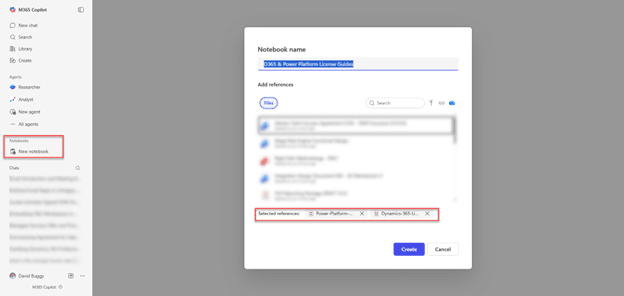
After clicking the Create button, my notebook has been created.
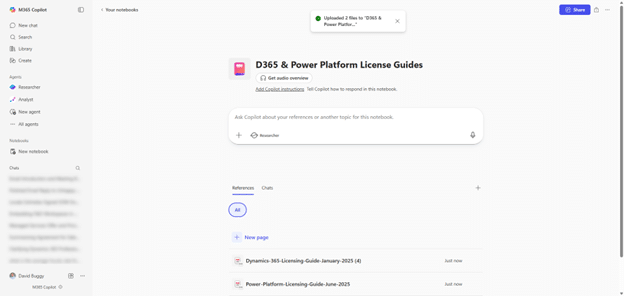
Get audio overview is a nice feature that will summarize the content in audio
I can now ask Copilot for information about Microsoft licensing. I started with a common question “How much database capacity is included with Dynamics 365 Sales Enterprise”, Copilot was able to quickly and accurately answer this question saving a lot of time vs opening the PDF and searching for this information.
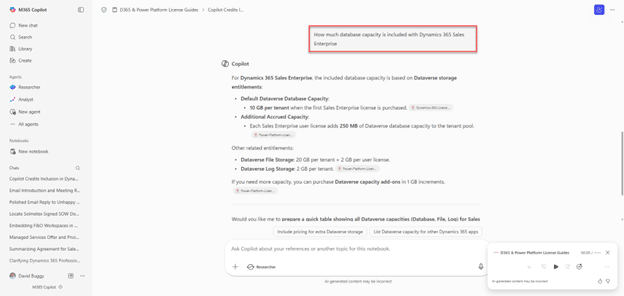
Chats (and results) are saved for future reference.
I can also ask Copilot for a summary of the information which can be helpful especially for larger data files.
Provide specific instructions to tell Copilot how to respond to chats in this notebook. For fun, I gave Copilot the following instructions: “Always respond in English but as a cowboy and add bullet points. Make sure to account for branding colors, grey 500 and orange 280. Write out numbers in words rather than numerals.”

Now I have a cowboy virtual advisor for Microsoft licensing information.
Copilot notebooks are a powerful tool grounded in the specific information you provide it.
As a leading Microsoft Copilot Partner, Velosio goes beyond deployment. We deliver end-to-end enablement to ensure Copilot Notebooks—and the broader Copilot suite—drive measurable business outcomes.
Ready to explore Copilot Notebooks? Here’s your roadmap:
Copilot Notebooks represent a paradigm shift in how organizations manage information and collaborate with AI. By creating focused, intelligent workspaces, they eliminate noise, accelerate decision-making, and unlock new levels of productivity.
But technology alone isn’t enough. Success depends on strategic adoption, governance, and cultural readiness—areas where Velosio excels as your trusted Microsoft Copilot Partner.
Transform your workflows with Copilot Notebooks.
Schedule a consultation with Velosio to discover how we can help you adopt AI responsibly, maximize ROI, and future-proof your business.
Talk to us about how Velosio can help you realize business value faster with end-to-end solutions and cloud services.