The Ultimate Guide to Running Dynamics ERP on Azure
Discover how a lift-and-shift migration moves your Dynamics ERP to Azure, eliminating hardware costs and improving security while keeping your current system intact.

Microsoft Dynamics can run smoothly on physical hardware, but that stability comes with hidden risks. The constant drain of hardware maintenance, exposure to on-premises cyber threats, and the limitations around scalability and upgrades all add up to a fragile foundation for such a critical system.
That’s why more organizations are turning to Dynamics on Azure. With a simple lift-and-shift migration, you move your existing ERP environment into Microsoft’s cloud without rebuilding or disrupting your workflows. The payoff is immediate: no more outdated servers creating security gaps, and no more costly hardware refreshes draining your IT budget.
A lift-and-shift migration provides your Dynamics ERP with a stronger foundation without disrupting how your system operates today. It creates a full copy of your current environment, including the operating system, Dynamics application, data, and other components.
Picture your ERP as a strong house sitting on unstable ground. The structure itself is solid, but the foundation has aged. A lift and shift migration picks up that entire house and places it on a new base built for modern demands. That base is Azure. The house looks and feels the same, but it now stands on ground that is stable, secure, and designed for growth.
Your users continue working exactly as they always have. The screens, reports, and workflows remain familiar. The difference lies behind the scenes, where speed increases, uptime improves, and protection becomes enterprise-grade.
Many people confuse a lift-and-shift migration with a move to Dynamics 365. These are two completely different paths. Dynamics 365 follows a Software-as-a-Service model that requires a new setup, data reconfiguration, and often significant change management.
Lift and shift is an Infrastructure-as-a-Service (IaaS) approach. It allows you to keep everything you have while letting Azure handle the infrastructure. Your ERP, data, and integrations remain intact. Azure provides the power, scalability, and global reliability that support the infrastructure behind the scenes.
For many organizations, this migration path offers the best of both worlds. It brings cloud-level flexibility, improved security, and predictable costs, while maintaining a consistent ERP experience for every user. The years spent building workflows, reports, and add-ons are not wasted.
A lift-and-shift migration is not simply a technical upgrade. It is a strategic choice. It strengthens what already works, eliminates the fragility of on-premises infrastructure, and prepares your business for the next stage of digital transformation.
At first glance, keeping your Dynamics ERP on local servers can seem practical. The system works, the setup feels familiar, and change often feels unnecessary. Yet, the signs of strain, such as aging hardware, increasing downtime, and growing security concerns, begin to appear quietly. When these issues start to accumulate, it signals that it’s time to migrate your Dynamics ERP to Azure.
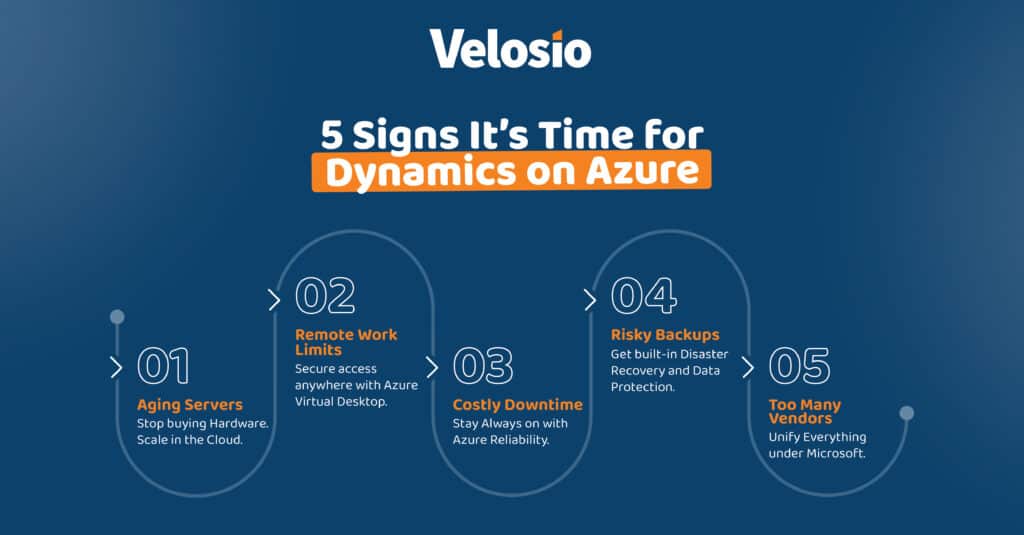
Replacing hardware used to be a routine task, but today it is considered an outdated investment. A new on-premises server locks your business into another five-year cycle of capital spending, maintenance, and eventual replacement. It is reinvesting in a model that no longer supports modern demands.
Azure eliminates that cycle. You transition from purchasing new equipment to utilizing scalable, cloud-based infrastructure that adjusts automatically and stays current with the latest technology. Your business avoids downtime and costs associated with physical upgrades, gaining a reliable environment that evolves with each system update. Instead of planning for the next replacement, you plan for growth.
The way organizations operate has transformed. Teams expect to connect from anywhere, on any device, while maintaining security and productivity. On-premises systems struggle to deliver that flexibility without complicated layers of VPNs, firewalls, and maintenance-heavy configurations.
Azure simplifies remote access with built-in protection and easy deployment. Through tools like Azure Virtual Desktop, employees can securely access Dynamics in the cloud, backed by Microsoft’s authentication, encryption, and compliance frameworks. IT teams spend less time managing user access and more time supporting business operations. The experience is seamless for users and safer for the organization.
Every hour of downtime costs more than lost productivity. It delays customer orders, halts accounting processes, and damages trust. On-premises servers are prone to outages caused by power issues, aging hardware, or internal errors. Each incident leads to repair costs, data recovery efforts, and lost revenue opportunities.
Azure minimizes that risk. Its global data centers feature redundancy, failover capabilities, and automatic backups, ensuring systems remain operational even during unexpected events. Recovery times are faster, service interruptions are rare, and operations continue with confidence. The result is consistent uptime that protects both reputation and revenue.
Many organizations rely on “best effort” backup routines that seem adequate until a real outage occurs. In those moments, recovery is often slow or incomplete. Azure transforms that scenario with enterprise-grade business continuity and disaster recovery capabilities.
Data is automatically replicated across multiple geographic regions to ensure availability in every situation. Automated recovery processes restore operations quickly, often within minutes. These safeguards protect critical financial data, inventory systems, and customer information. Instead of reacting to crises, your business operates with the assurance that it can withstand them.
Managing multiple technology vendors can often lead to confusion, longer support cycles, and higher costs. Integrating your ERP into Azure helps eliminate that fragmentation. For businesses already using Microsoft 365, it creates a unified environment where infrastructure, applications, and productivity tools work together under one trusted provider.
This consolidation simplifies billing, strengthens security oversight, and reduces administrative overhead. With everything inside one ecosystem, updates align naturally, integrations perform better, and IT management becomes more predictable. The business gains both simplicity and strategic focus by operating within a single, reliable platform.
Moving your Dynamics ERP to Azure delivers more than financial predictability. It reshapes how your systems perform, scale, and stay protected. The operational gains are what truly distinguish this move.
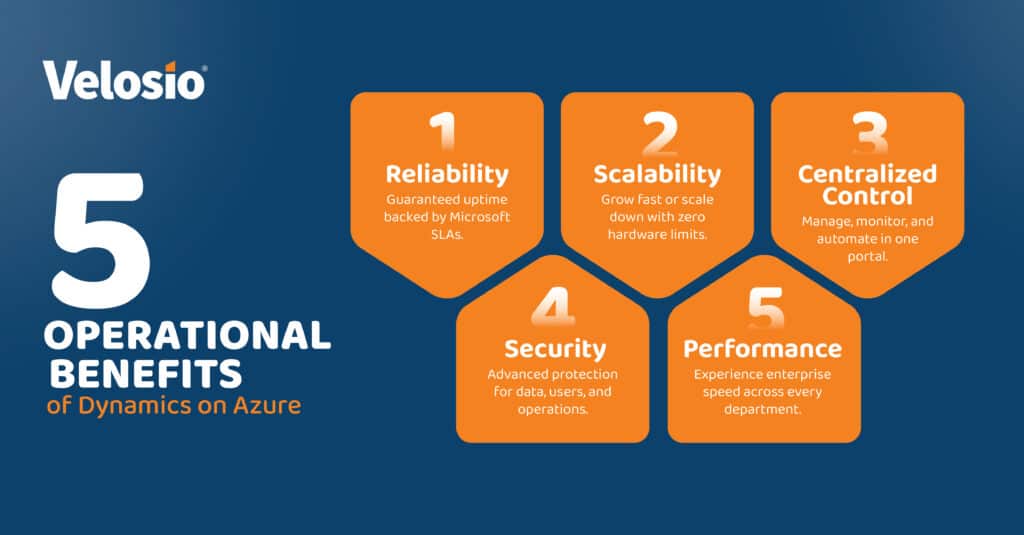
Reliability is one of the strongest reasons businesses choose Dynamics on Azure. The platform is engineered for continuity. Each workload operates within Microsoft’s network of globally distributed data centers, providing multiple layers of redundancy that keep systems running even in the event of local disruptions. Azure’s financially backed Service Level Agreements guarantee uptime and performance, creating a level of dependability that traditional on-premises setups struggle to achieve.
Routine maintenance, updates, and security patches are implemented with minimal or no downtime, ensuring your operations remain uninterrupted. The infrastructure automatically detects and routes around hardware failures, ensuring that your ERP environment remains accessible at all times. This built-in resilience means fewer service interruptions, faster recovery during incidents, and continuous access to the data that drives your business.
For leadership teams, this reliability translates to confidence. Employees stay productive, clients experience consistent service, and IT teams spend less time firefighting technical issues. With Azure’s infrastructure in place, your Dynamics ERP runs on a foundation that performs predictably, scales intelligently, and supports business continuity even during periods of high demand or unexpected stress.
Every business experiences periods of high activity and quieter stretches. Month-end reporting, year-end audits, or seasonal demand can place enormous strain on on-premises systems that are locked into fixed capacity. Dynamics on Azure changes that entirely. With a lift-and-shift environment, you gain the flexibility to scale resources up or down within minutes, ensuring your ERP always performs at its best without the cost of overprovisioned hardware.
When workloads increase, additional processing power and storage can be activated instantly. Once the demand stabilizes, those resources can be scaled back just as quickly. This elastic model allows organizations to pay only for what they use, eliminating the inefficiency of maintaining unused capacity. It creates a more agile infrastructure that adjusts to business cycles instead of dictating them.
The operational benefit goes beyond cost. Scalability ensures that users experience consistent performance even during heavy workloads. Reports are generated more quickly, transactions are processed smoothly, and critical tasks are completed efficiently without delay. The business gains both speed and control, maintaining productivity across every department without sacrificing stability.
Modern IT management depends on visibility and control. Dynamics on Azure provides both through a single, unified portal that simplifies how teams oversee and maintain their ERP environment. Azure’s management console brings together monitoring, configuration, and automation tools that eliminate the patchwork approach often required with on-premises systems.
Through this centralized platform, IT teams can track performance metrics, review usage patterns, and identify potential issues before they escalate. Updates, security patches, and backups can be scheduled automatically, ensuring critical processes run on time without human oversight. This level of automation reduces the risk of error, saves hours of manual labor, and provides system consistency across the organization.
The portal also enhances accountability. Administrators gain real-time insight into activity logs, permissions, and compliance settings, creating a clear record of every action taken within the system. That visibility helps maintain governance standards and supports internal audits without added complexity.
Security remains one of the primary reasons businesses migrate their Dynamics ERP to Azure. On-premises servers often depend on limited internal resources, irregular patching cycles, and reactive defense strategies. Azure eliminates these gaps by providing a deeply fortified infrastructure supported by Microsoft’s global expertise and around-the-clock security operations.
Each year, Microsoft invests billions of dollars into security innovation, including advanced threat detection, AI-driven monitoring, and infrastructure hardening. These systems work together to identify, isolate, and neutralize potential risks before they impact your operations. The result is a security posture that very few organizations can achieve independently.
Your Dynamics ERP maintains its familiar interface and functionality, but the environment supporting it becomes far more resilient. The physical and network layers are protected by multiple levels of defense, including access control, encryption, and continuous vulnerability testing. Security teams across Microsoft’s global network monitor and analyze billions of signals daily to ensure threats are detected and mitigated in real time.
Running your Dynamics ERP on Azure is more than an infrastructure decision. It is a strategic move that prepares your business for long-term flexibility and growth. By modernizing your environment now, you reduce risk, improve performance, and create a smooth path toward future innovation.
A complete ERP re-implementation often brings cost, complexity, and downtime. Moving your current Dynamics system to Azure removes that immediate burden. Once your ERP operates in the cloud, the foundation for future upgrades is already in place. The infrastructure is secure, compliant, and ready for modernization without interrupting business continuity.
A lift-and-shift migration places your entire Dynamics environment, including data, reports, and configurations, within the Azure ecosystem. This creates alignment with Microsoft’s cloud technologies and ensures your business is already positioned for the next stage of transformation. Your systems gain access to advanced cloud tools, analytics, and integration capabilities that on-premises setups cannot match.
Familiarity eliminates friction. Once your ERP runs on Azure, your employees naturally adapt to working in a cloud environment. They understand how to access, navigate, and operate the system remotely. This readiness shortens the adjustment period when the business decides to move into modern ERP solutions such as a future migration to Dynamics 365 Business Central.
Separate the Infrastructure Decision from the Application Decision
Businesses often delay modernization because they see infrastructure and application upgrades as a single step. Moving Dynamics to Azure breaks that dependency. It allows you to modernize the foundation first, then choose the right moment to upgrade the ERP application. This staged approach reduces disruption and puts you in control of timing, budget, and scope.
The strategic advantage of Dynamics on Azure lies in its flexibility and scalability. It gives you a faster, more secure environment today while setting the stage for transformation tomorrow. Your ERP becomes part of a future-ready ecosystem that grows with your goals.
This is the true power of the lift and shift approach. It safeguards your present, positions you for the future, and ensures that every modernization step happens at your pace, not the technology’s.
Running Dynamics on Azure delivers more than a technical upgrade. It eliminates the constant strain of hardware maintenance, strengthens system security, and introduces cost predictability that traditional setups can never match. The transition is seamless, preserving everything your team already knows while solving the most pressing on-prem challenges.
The lift-and-shift approach offers an immediate advantage. It frees your ERP from aging infrastructure, replaces unpredictable capital expenses with a stable operational model, and provides the reliability that modern organizations demand. Each improvement comes with lower risk, higher uptime, and better control over every part of your IT environment.
Most importantly, it creates a bridge to the future. By aligning your ERP with Azure today, you open the door to future innovation without the pressure of having to start over. Your data, team, and infrastructure are already well-positioned for what comes next in the Microsoft ecosystem.
It is the rare move that delivers both short-term relief and long-term readiness, all with minimal disruption to users and daily operations.
Ready to see the real numbers? Request a complimentary, no-obligation migration assessment and discover how running your Dynamics ERP on Azure compares to your next server refresh.
With more than 30 years of experience, Velosio helps organizations modernize applications, simplify operations, and harness the power of AI and data. As a trusted Microsoft partner, Velosio guides business leaders from adoption to impact — ensuring every AI initiative delivers measurable results.
Yes, absolutely. A lift-and-shift migration transfers an exact copy of your existing server environment into Azure. Every customization, integration, and third-party add-on functions exactly as it does today. Nothing changes in the way your ERP operates, which means full compatibility without rework.
No. Your team continues using the same Dynamics application they rely on every day. The interface, menus, and workflows remain identical, allowing employees to stay productive without additional training. This familiarity is one of the most valuable benefits of the lift-and-shift approach.
Yes. Dynamics hosted on Azure operates within a highly protected environment. Your ERP benefits from Microsoft’s secure global network, layered physical data center protection, and continuous threat detection supported by advanced AI. These safeguards create a level of security that is nearly impossible to achieve in a traditional on-premises setup.
Talk to us about how Velosio can help you realize business value faster with end-to-end solutions and cloud services.